Google Shopping has become one of the most powerful acquisition channels for ecommerce brands in Singapore, but performance rarely comes from setup alone. Success depends on how well your product data, campaign structure and optimisation workflow work together over time. This guide brings the proven best practices to optimize Google Shopping campaigns into one practical framework, covering how product feeds influence visibility, how campaign structure affects control, and how ongoing optimisation drives consistent return on ad spend.
What this guide covers
- Why Google Shopping optimisation matters
- Product feed optimisation, the foundation of performance
- Campaign structure that gives you control
- Finding winners, cutting waste and refining bids
- Merchant Center health and measured optimisation
- Scaling with Performance Max and hybrid approaches
Best Practices at a Glance
If you only act on a handful of things, start here. The table summarises the highest-impact best practices and why each one matters.
| Best practice | Why it matters |
|---|---|
| Optimise the product feed first | Feed quality decides visibility, relevance and eligibility |
| Write search-led product titles | Titles act as your ad headline and drive click-through rate |
| Segment campaigns by attribute | Gives bid and budget control over margin and performance |
| Identify winners and losers early | A small share of products usually drives most revenue |
| Add negative keywords | Blocks irrelevant queries and stops budget waste |
| Adjust bids by device, location and time | Conversion rates vary, flat bidding leaves money on the table |
| Monitor Merchant Center health | Disapproved products silently kill visibility |
| Change gradually and measure | Shopping campaigns are sensitive to abrupt changes |
Why Google Shopping Optimisation Matters
Google Shopping ads appear at the exact moment users search with purchase intent, which makes them highly valuable and highly competitive. The scale is significant: Shopping ads account for roughly 76% of retail search ad spend and around 85% of retail paid search clicks, with over a billion Shopping searches every month. That is enormous reach, but it also means small inefficiencies scale into large budget waste quickly.
The economics reward discipline. The average Shopping conversion rate sits at about 1.91%, and the typical advertiser spends several hundred dollars a month, much of it wasted on weak foundations. Without a clear optimisation strategy it becomes difficult to control spend, identify profitable products or scale campaigns sustainably.
Start With Product Feed Optimisation
Your product feed is the foundation of every Google Shopping campaign. Google uses feed data to decide when your ads appear, how relevant they are and which products are eligible to show. A well-optimised feed improves both visibility and conversion potential.
Core Product Data That Impacts Performance
Accurate, complete product data helps Google match your products to the right searches. Prioritise:
- Product titles that clearly describe the item and its key attributes
- High-quality images that accurately represent the product
- Correct pricing, sale price and currency formatting
- Up-to-date availability and stock status
- Clean, crawlable product URLs
Feed errors are consistently among the top reasons for lost impression share, even when budgets are sufficient. Price mismatches between your feed and landing page are the single most common cause of disapprovals, and even a one-cent difference can trigger an error that pulls the product offline.
Product Titles and Images Drive Click-Through Rate
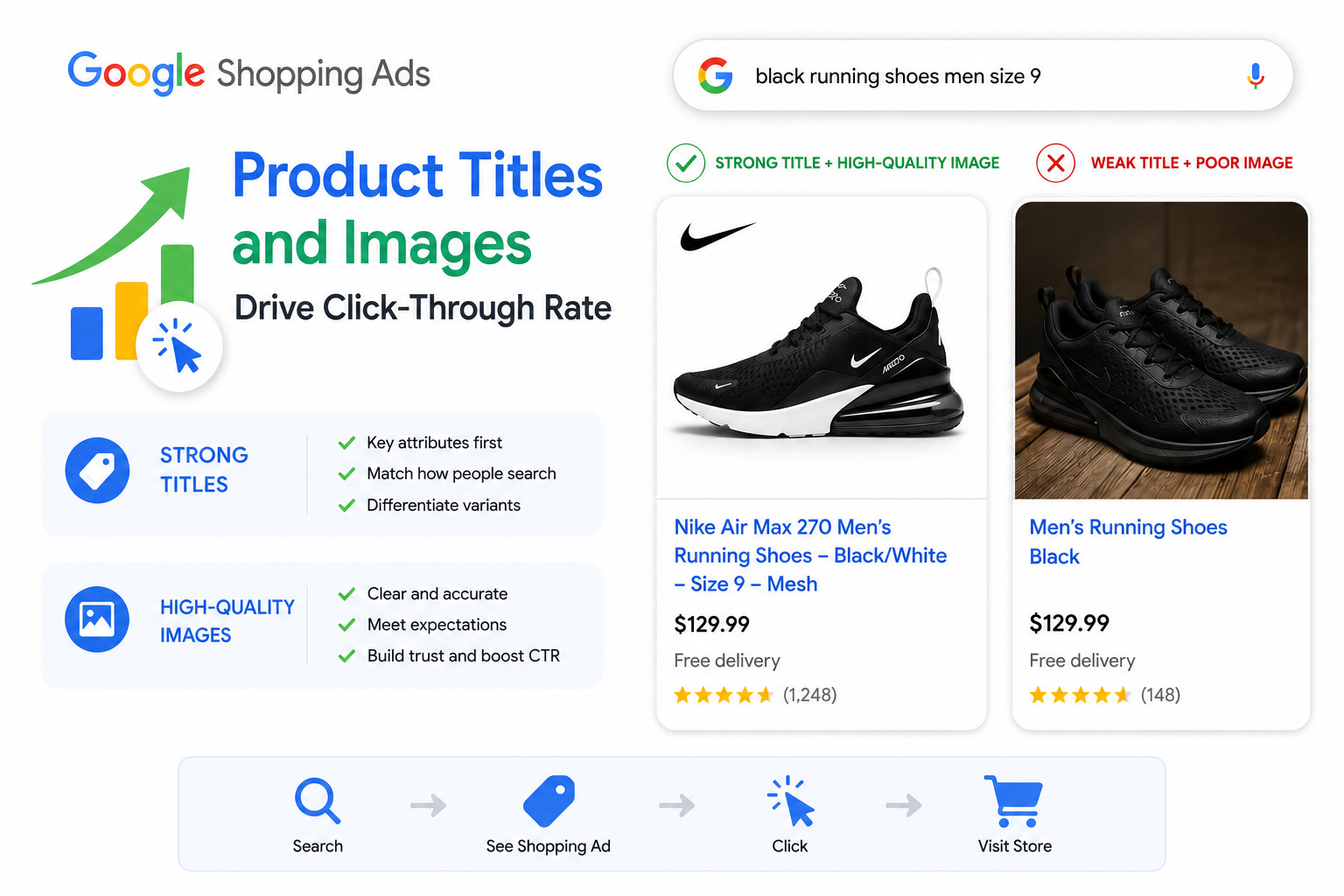
Shopping ads do not allow custom ad copy, so your product title and image are effectively your headline and creative. Strong titles place the most important attributes first, reflect how users actually search, and differentiate variants clearly by size, colour, material or model. High-quality images lift click-through rate, reduce mismatched expectations after the click, and build trust, especially for apparel and lifestyle products.
Enrich Feeds With Additional Attributes
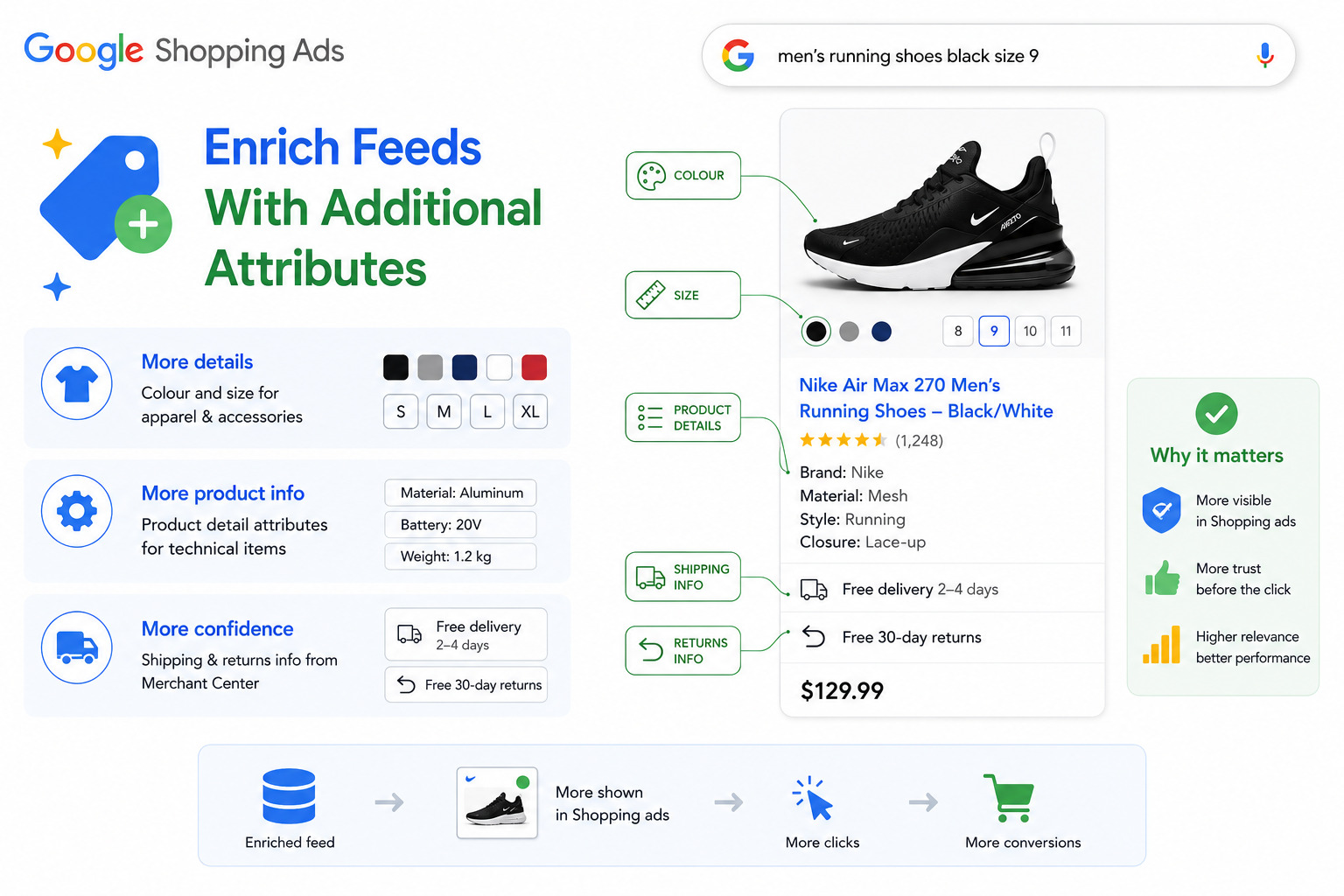
In competitive categories, required attributes alone are rarely enough. Optional attributes help your products stand out and improve relevance:
- Colour and size for apparel and accessories
- Product detail attributes for technical or complex items
- Shipping and return information configured in Merchant Center
Google displays many of these attributes directly in Shopping ads, giving users more confidence before they click.
Build a Campaign Structure That Supports Control
Campaign structure determines how much control you have over bids, budgets and optimisation decisions. A single campaign with one bid for all products limits your ability to prioritise high-margin items, reduce spend on underperformers, and respond to seasonal or inventory changes.
Instead, segment Shopping campaigns using feed attributes such as:
- Category or product type
- Brand
- Item ID for top performers
- Custom labels for margin, seasonality or priority
Well-structured campaigns let you adjust bids based on real performance rather than averages.
Use Ad Groups and Product Groups Strategically
Ad groups act like departments in a store, keeping similar products together and ensuring relevance between listings and queries. Logical grouping improves reporting clarity, makes bid adjustments more precise, and prevents high-performing products from being dragged down by weaker ones. For products with variants, grouping related items correctly ensures users see the right version and pricing when they click.
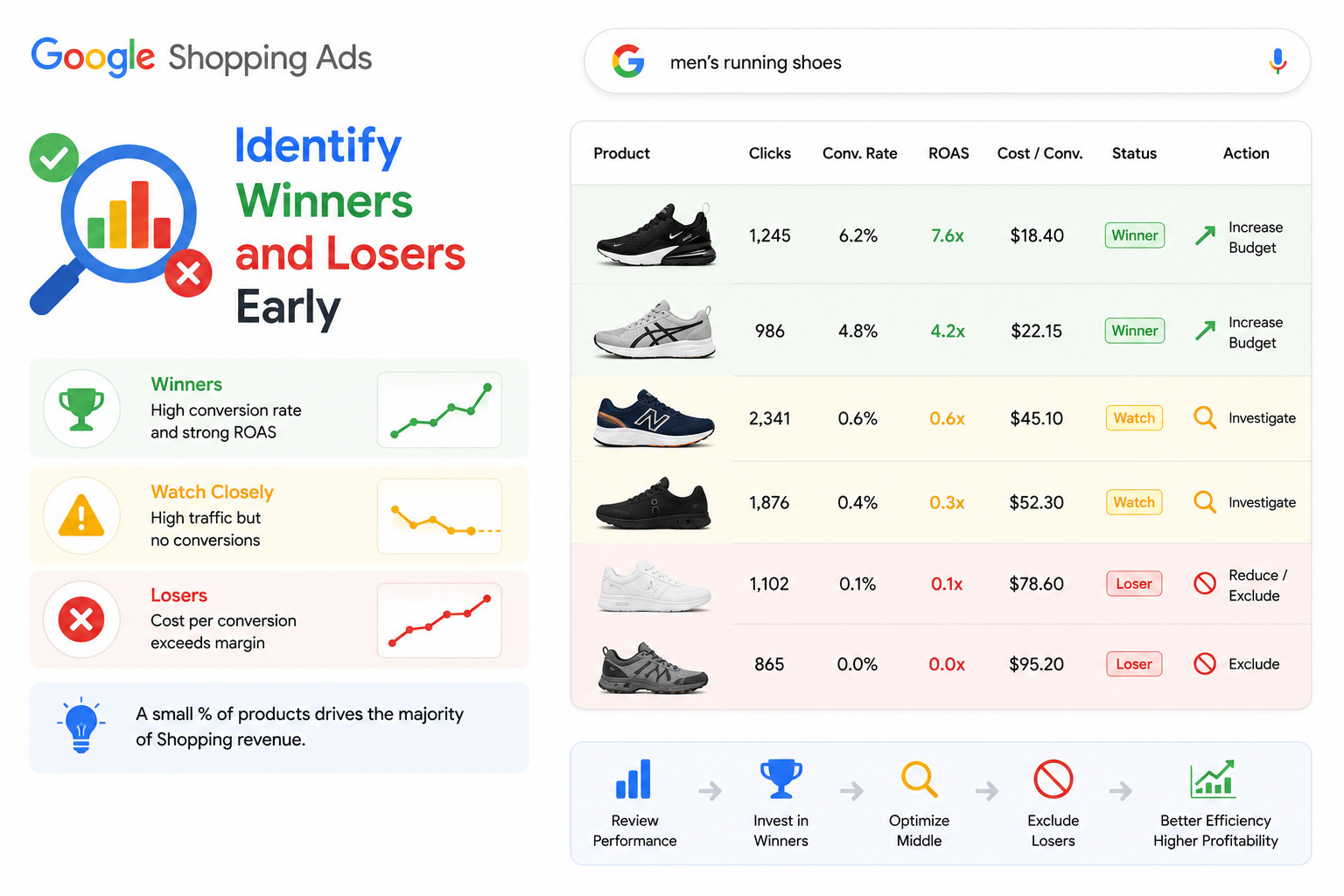
Identify Winners and Losers Early
Not all products deserve the same investment. Review performance data regularly to spot:
- Products with strong conversion rates and ROAS
- Items with high traffic but no conversions
- Products where cost per conversion exceeds margin
Shifting budget toward winners and excluding consistent losers is one of the fastest ways to improve efficiency. In most accounts a small percentage of products generates the majority of Shopping revenue, so structuring campaigns around that reality improves both profitability and scalability.
Exclude Waste With Negative Keywords
Unlike Search campaigns, you cannot choose which keywords trigger Shopping ads, but you can control what should not. Negative keywords prevent irrelevant searches, mismatched intent and clicks from users looking for products you do not sell.
- Campaign-level negatives block irrelevant queries across all products.
- Ad-group-level negatives give granular control and reduce overlap between similar product groups.
Consistent search-term reviews are essential. Audits routinely find that a large share of wasted spend comes from queries that could have been excluded early.
Refine Bidding With Performance Signals
Not all clicks are equal. Bid adjustments focus spend where conversions are most likely:
- Increase bids in high-performing locations
- Adjust bids by device based on conversion behaviour
- Modify bids by time of day or day of week
Conversion rates and cost efficiency vary significantly by device and timing. Flat bidding structures ignore these patterns and reduce efficiency.
Test Creatives and Titles With A/B Testing
Even small changes in product titles or images can produce measurable differences. Structured A/B testing removes guesswork, reveals patterns in what attracts clicks, and improves CTR and conversion over time. Keep tests incremental: changing too many variables at once makes it impossible to isolate what actually improved performance.
Monitor Merchant Center Health Continuously
Merchant Center is not just a setup step, it is an ongoing diagnostic tool. Regular checks catch disapproved products, missing or invalid attributes, price or availability mismatches, and policy warnings that limit visibility. Many Shopping campaigns underperform not because of bidding, but because products are partially or fully ineligible.
Measure Changes and Optimise Gradually
Google Shopping campaigns are sensitive to change. Best practice is to make controlled adjustments, wait one to two weeks before evaluating impact, compare against a previous period, and track changes using account history. Large bid swings or frequent restructuring often destabilise performance rather than improve it.
Scaling With Performance Max and Hybrid Approaches
Performance Max is now central to Google Shopping, and it works best when conversion tracking is accurate, feeds are clean and enriched, and goals are clearly defined. Crucially, Performance Max cannot compensate for poor data: if attributes are missing or generic, the automation learns slowly and scales inefficiently.
Many advertisers use a hybrid approach:
- Standard Shopping for top-performing, high-control segments
- Performance Max to expand reach and discover new demand
This balance allows scale without losing visibility into what drives results.
Final Thoughts
Optimising Google Shopping campaigns is not a one-time task. It is an ongoing system that connects feed quality, campaign structure, bidding logic and performance analysis. When product data is accurate, campaigns are structured for control, and decisions are guided by real performance, Shopping ads become one of the most reliable growth channels in ecommerce.
The brands that win are not the ones spending the most. They are the ones who continuously refine how products are shown, who they are shown to, and how budget is allocated based on data rather than assumptions.
Execution matters as much as strategy. At MediaPlus Digital, we manage Google Shopping Ads as a performance-driven system, not a set-and-forget campaign, covering feed optimisation, campaign structuring, bid strategy and ongoing performance analysis so spend stays focused on the products and queries that actually drive revenue. It pairs naturally with ecommerce SEO and a conversion-ready ecommerce website for full-funnel growth.
Frequently Asked Questions
What is the most important factor in optimising Google Shopping campaigns?
Product feed quality. Google uses your feed to decide when and where your ads show, so accurate titles, images, pricing and availability drive both visibility and conversion. Even Performance Max is only as good as the feed behind it.
How should I structure a Google Shopping campaign?
Segment products using feed attributes such as product type, brand, item ID for top performers, and custom labels for margin, seasonality or priority, so you control bids and budget rather than treating every product the same.
How do negative keywords work in Google Shopping?
You cannot choose which keywords trigger Shopping ads, but you can add negatives to block irrelevant searches. Campaign-level negatives apply across all products, while ad-group-level negatives give granular control.
How often should I optimise a Google Shopping campaign?
Review search terms and Merchant Center health weekly, but make controlled changes and wait one to two weeks before judging impact. Large bid swings or frequent restructuring tend to destabilise performance.
Should I use Standard Shopping or Performance Max?
Many advertisers use a hybrid: Standard Shopping for top-performing, high-control segments and Performance Max to expand reach. Performance Max works best with accurate conversion tracking and clean, enriched feeds.
Turn Google Shopping Into a Growth Engine
When Google Shopping is managed with discipline, data and experience, it stops being a cost centre and becomes a scalable ecommerce growth engine. Let MediaPlus Digital run yours as a performance system.