Google Ads has grown far beyond simple text ads. Today, the platform offers a mix of formats across Search, Display, YouTube, Maps, Gmail, Shopping, and Google’s entire advertising network. Choosing the right type of campaign matters because each one serves a different purpose from capturing high-intent leads to building brand awareness or driving product sales.
Below is a full breakdown of all 10 types of Google Ads, grouped by campaign category, plus guidance on when each type works best.
1. Search Campaigns
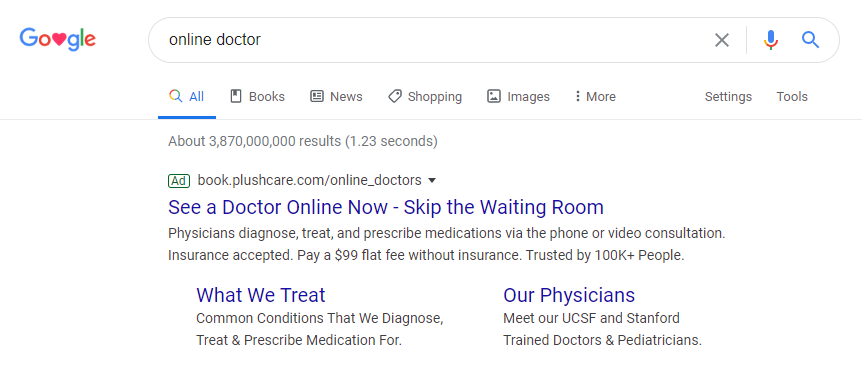
Search campaigns are the foundation of Google Ads. These are the text ads that show up when someone types a query on Google and your ad matches what they’re looking for. Because they capture demand at the exact moment someone is searching, they remain the most reliable way to generate qualified traffic.

When Search campaigns work best
Search campaigns shine when you want to reach people who already have intent. They’re ideal for businesses aiming to get:
-
Leads
-
Calls
-
Bookings
-
Quote requests
-
Direct purchases
If someone searches “aircon repair near me,” “best HR software,” or “buy sofa online,” Search ads can place your brand in front of them at the perfect moment.
Types of Search Ads
- Responsive Search Ads (RSAs): You provide a set of headlines and descriptions, and Google uses machine learning to choose the best combination based on each user’s search behaviour.
- Call Ads: These are built for businesses that rely on phone calls. Instead of leading users to a landing page, they push people to call directly from the ad.
- Dynamic Search Ads (DSAs): Google scans your website and automatically creates tailored ads based on your content. These work well for large sites or businesses with constantly changing inventory.
Pros
-
Very high intent
-
Easy to track ROI
-
Strong performance for lead generation and sales
Cons
-
Competitive, especially in high-demand industries
-
Pure text format limits visual creativity
2. Display Campaigns
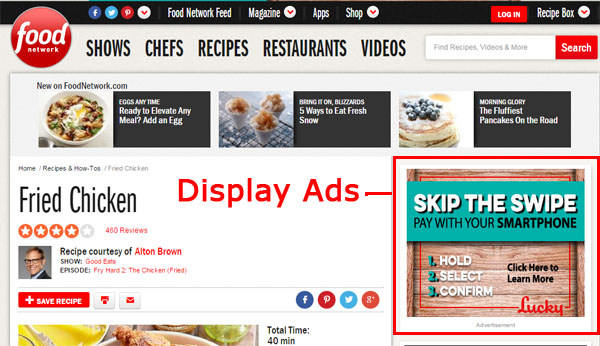
Display campaigns use image-based ads that appear across millions of websites within the Google Display Network. Instead of capturing active search demand, they push your brand to audiences as they browse online.

When Display campaigns work best
Use Display when you want to:
-
Build brand awareness
-
Stay top of mind
-
Run remarketing campaigns
-
Reach niche audiences at scale
They help you reach people before they know they need you.
Types of Display Ads
- Single Image Ads: Simple, static creatives you upload directly.
- Responsive Display Ads (RDAs): Google automatically adapts your headlines, descriptions, and images to fit different placements. This increases reach and typically improves performance.
Pros
-
Massive reach
-
Cost-effective
-
Strong for remarketing and nurturing
Cons
-
Lower intent compared to Search
-
Results depend heavily on creative quality
3. Video Campaigns (YouTube Ads)
Video campaigns let you advertise on YouTube and video partner sites. They’re highly visual and help brands explain, inspire, and persuade in ways text ads can’t.
When Video campaigns work best
Perfect for businesses with:
-
Products that require demonstration
-
Compelling brand stories
-
Strong creatives
-
Goals around awareness and consideration
Video ads help you connect emotionally with viewers and drive engagement at scale.
Types of YouTube Ads
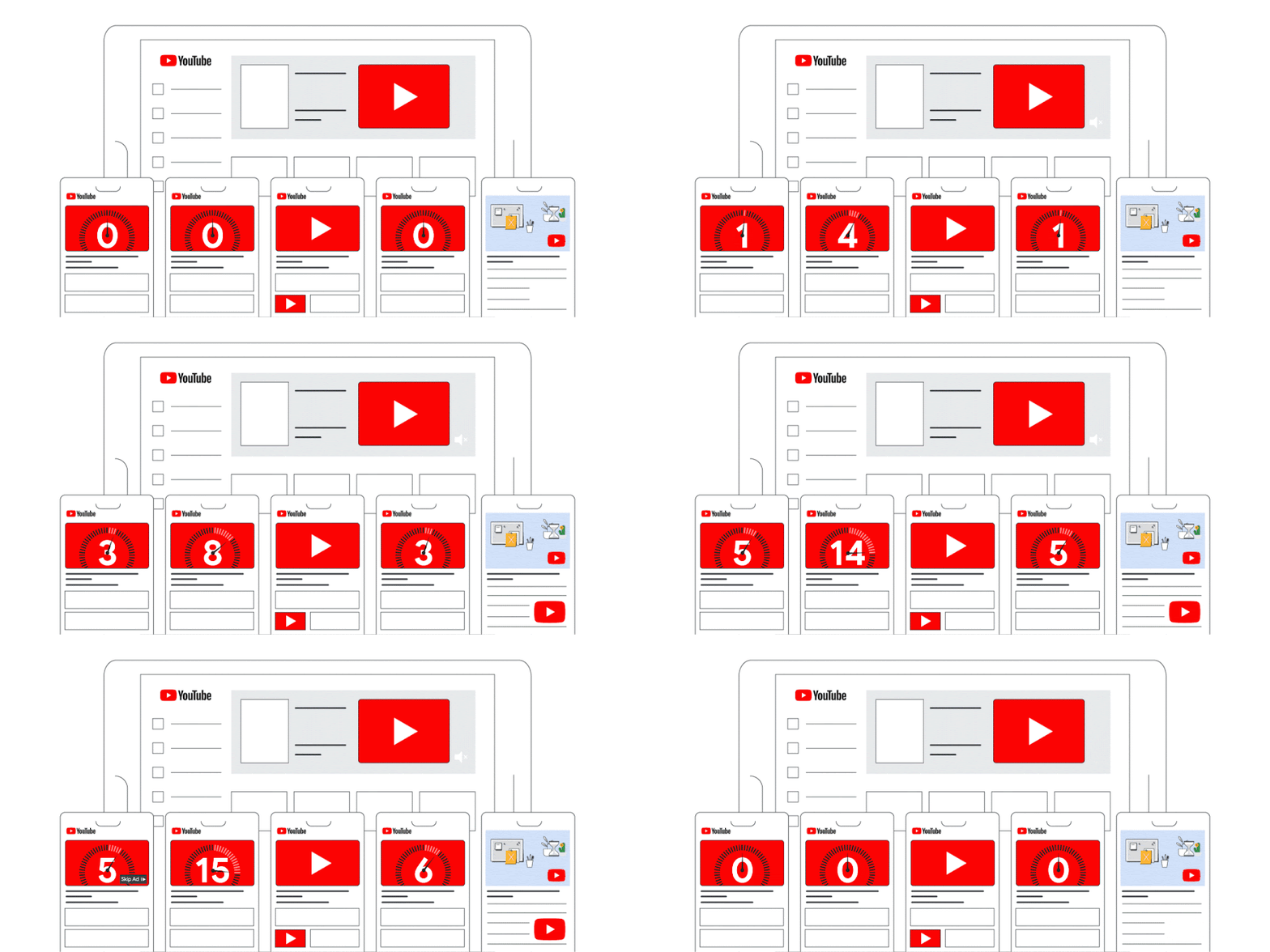
- Skippable In-Stream Ads: Viewers can skip after five seconds. Good for storytelling and broad awareness.
- Non-Skippable In-Stream Ads: Short clips (up to 15 seconds) that users must watch. Works for punchy messages.
- In-Feed Video Ads: Shown in YouTube search results and recommendation feeds. Great for educational or review-style content.
- Bumper Ads: Six-second non-skippable ads. Ideal for quick reminders or branding.
- Outstream Ads: Mobile-only video ads on partner sites, played without sound initially.
- Masthead Ads: Premium placement at the top of YouTube’s homepage. High-impact but only available through reservation.
Pros
-
High engagement
-
Huge audience reach
-
Flexible targeting based on interests, demographics, and behaviour
Cons
-
Requires strong creative
-
Can be competitive in certain industries
4. Shopping Campaigns
Shopping campaigns are tailored for ecommerce and retail. They show a product image, title, price, and brand directly in the search results often before organic listings.
When Shopping campaigns work best
Use them when you want to:
-
Promote an entire product catalog
-
Drive ecommerce sales
-
Compete visually in search results
-
Reach high-intent shoppers
They’re especially powerful for products with clear pricing and comparison factors.
Types of Shopping Ads
- Product Shopping Ads: Standard product tiles you see on Google Search and Shopping results.
- Local Inventory Ads: Show real-time stock availability to nearby shoppers. Great for retailers with physical stores.
Pros
-
High purchase intent
-
Strong click-through rates
-
Visually appealing
Cons
-
Requires a well-optimised product feed
-
Needs Merchant Center setup and ongoing maintenance
5. Smart Campaigns
Smart Campaigns are built for simplicity. They are designed to remove most of the complexity from Google Ads by automating nearly every major decision in the campaign setup and optimization process. Once you define a basic goal, Google takes over bidding, targeting, creatives, and placements.
These campaigns are often the first entry point into Google Ads for small businesses.

How Smart Campaigns work
Smart Campaigns require very little input. You typically provide:
-
Business information
-
A basic ad message
-
Budget
-
Primary goal, such as calls, visits, or website actions
Google then automatically:
-
Chooses keywords and audiences
-
Sets bids
-
Determines where ads appear
Ads can show across Search, Display, Maps, and other Google-owned properties without manual placement control.
Strengths of Smart Campaigns
-
Extremely quick and easy to launch
-
Minimal ongoing management required
-
Suitable for businesses without dedicated marketing teams
-
Works well for simple, local objectives
Key limitations
-
Very limited visibility into keywords, placements, and search terms
-
Little room for manual testing or advanced optimization
-
Performance improvements tend to plateau quickly
-
Not well suited for complex funnels or scaling strategies
When Smart Campaigns make sense
Smart Campaigns are best for:
-
Small businesses just starting with Google Ads
-
Local service providers with simple goals
-
Advertisers who prioritize ease over control
For businesses planning to grow aggressively or optimize at scale, Smart Campaigns usually become a short-term solution rather than a long-term strategy.
6. Performance Max Campaigns
Performance Max is Google’s most advanced and aggressive automation-driven campaign type. Instead of running separate campaigns for each channel, Performance Max consolidates everything into one campaign that spans the entire Google ecosystem.

A single Performance Max campaign can serve ads across:
-
Search
-
Display
-
YouTube
-
Shopping
-
Gmail
-
Maps
-
Discover
How Performance Max works
Performance Max is goal-focused. You define a conversion objective, such as purchases, leads, or store visits, and Google’s system dynamically allocates budget across channels to maximize that goal.
The campaign uses:
-
Audience signals
-
Creative assets (text, images, video, product feeds)
-
Conversion data
-
Real-time user behavior
Based on these signals, Google continuously shifts spend toward placements and formats that are most likely to drive conversions.
Strengths of Performance Max
-
Massive reach across all major Google platforms
-
Strong performance for ecommerce and product-based businesses
-
Effective at uncovering new audiences beyond search intent
-
Reduces the need to manage multiple campaign types
Key drawbacks
-
Requires sufficient budget and conversion volume to optimize effectively
-
Limited transparency into which channels or keywords drive results
-
Less control over bidding, placements, and creative sequencing
-
Can be inefficient if goals or tracking are poorly defined
When Performance Max performs best
Performance Max is best suited for:
-
Ecommerce brands with product feeds
-
Businesses with clear, well-tracked conversion goals
-
Advertisers seeking scale rather than granular control
For teams that need tight keyword control, strict brand safety rules, or detailed channel-level optimization, Performance Max can feel restrictive. Used correctly, however, it can be one of the most powerful tools in the Google Ads ecosystem.
7. App Campaigns
App Campaigns are designed specifically to promote mobile applications across the entire Google ecosystem. Instead of manually creating ads for different channels, you provide your app store listing and a set of creative assets, and Google automatically generates and optimizes ads for you.
These campaigns are highly automated and rely heavily on machine learning. Google pulls information directly from your app store page, such as the app description, screenshots, ratings, and reviews, then combines them with your uploaded assets to build ads dynamically.

Where App Campaigns show
App Campaigns can appear across:
-
Google Search
-
Google Play Store
-
YouTube
-
Google Display Network
The system continuously tests different combinations of text, images, and videos to identify what drives the best results based on your campaign goal.
Types of App Campaigns
- App Install: Focused on driving new installs at scale. This type is optimized for users who are most likely to download your app.
- App Engagement: Targets existing users and encourages them to take specific in-app actions, such as completing a purchase, booking a service, or returning to the app after inactivity.
- App Pre-Registration: Available only on Android. This campaign type allows users to pre-register for an app before launch, helping you build demand and signal early interest ahead of release.
What makes App Campaigns effective
-
Full-funnel reach, from discovery to action
-
Optimization based on real in-app events, not just installs
-
Minimal setup and ongoing management
-
Scales well once enough conversion data is available
Limitations to be aware of
-
Very limited control over targeting and placements
-
Performance depends heavily on the quality of your app store listing
-
Requires proper in-app tracking and event setup to perform well
Best use cases
App Campaigns work best for:
-
Businesses with an active mobile app
-
Products with clear, measurable in-app actions
-
Teams comfortable with automation and data-driven optimization
If you cannot track meaningful in-app events, App Campaigns will struggle to optimize effectively.
8. Discovery Campaigns
Discovery Campaigns are built for visual-first advertising and broad reach beyond traditional search. These ads appear on some of Google’s most engaging, feed-based surfaces, where users are browsing rather than actively searching.

Where Discovery ads appear
Discovery ads can show across:
- YouTube Home feed
- YouTube Watch Next feed
- Gmail Promotions and Social tabs
- Google Discover
These placements allow brands to reach users earlier in the decision journey, often before explicit search intent exists.
How Discovery Campaigns work
Discovery Campaigns rely on audience signals rather than keywords. Google uses:
- User behavior
- Interests
- Past interactions
- Remarketing lists
Ads are delivered in native formats that blend naturally into feeds, making them less disruptive and more engaging than traditional display banners.
Strengths of Discovery Campaigns
- Access to a massive, high-engagement audience
- Strong emphasis on visuals and storytelling
- Excellent for brand awareness and remarketing
- Performs well on mobile-first audiences
Key limitations
- Limited manual control over placements and targeting
- Requires Smart Bidding to function
- Performance can be inconsistent without strong creative assets
- Not ideal for keyword-driven, high-intent acquisition
When Discovery Campaigns make sense
Discovery Campaigns are best suited for:
- Brands with strong visual content
- Top-of-funnel awareness campaigns
- Retargeting users who already know the brand
- Businesses looking to expand reach beyond search intent
If your creative is weak or your offer needs heavy explanation, Discovery ads may underperform. When visuals and messaging are strong, they can be a powerful reach and engagement channel.
9. Local Campaigns (Legacy)
Local Campaigns were originally designed for businesses with physical locations, with one clear objective: drive real-world actions, especially in-store visits. Instead of focusing on clicks or website traffic, these campaigns optimized toward behaviors like getting directions, calling a store, or physically visiting a location.
How Local Campaigns worked
Local Campaigns relied heavily on data from Google Business Profile and the ad delivery ecosystem of Google. Once set up, ads were automatically shown across multiple Google properties, including:
-
Google Search
-
Google Maps
-
YouTube
-
Google Display Network
Advertisers only needed to provide:
-
Store locations
-
Budget
-
Basic creatives such as images, headlines, and CTAs
From there, Google handled targeting, bidding, and placements using automation. The system prioritized users who were nearby and showed intent to visit a physical location.
Why Local Campaigns were sunset
Over time, Google moved toward a more unified, automation-driven ad system. Maintaining a separate campaign type just for local objectives created unnecessary complexity.
As a result, Local Campaigns (Legacy) have been fully migrated into Performance Max.
This migration does not mean local objectives disappeared. Instead:
-
Store visits and offline conversions are still supported
-
More signals are used, including behavior, location, and intent
-
Ads are distributed more efficiently across all Google channels
In practice, Performance Max replaced Local Campaigns with a broader, more powerful structure.
When Local Campaigns were most effective
Local Campaigns worked best for:
-
Retail chains
-
Restaurants and cafés
-
Gyms, spas, and salons
-
Showrooms and service locations that depend on foot traffic
Today, any business running local advertising must use Performance Max with local goals enabled.
10. Local Services Ads (LSAs)
Local Services Ads are fundamentally different from traditional Google Ads. They are designed specifically for service-based businesses, not ecommerce or general lead generation.
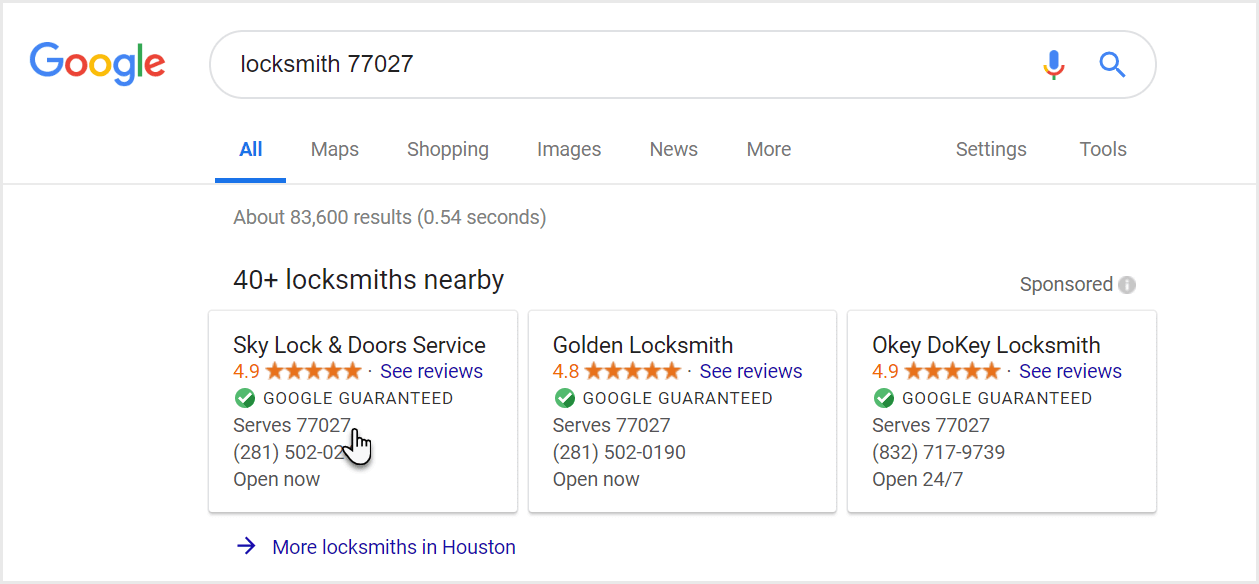
LSAs appear above all other ads and organic results on Google Search, making them one of the most visible ad formats available.
Instead of sending users to a website, LSAs allow people to contact a service provider directly from the search results by calling or sending a message.

How LSAs work
LSAs operate on a pay-per-lead model, not pay-per-click. You are charged only when a potential customer contacts you through the ad.
Key features include:
-
Prominent placement at the very top of Search
-
Business name, rating, and reviews shown upfront
-
Call and message buttons built directly into the ad
Because of this setup, LSAs often generate higher-quality leads compared to standard Search Ads.
Types of Local Services Ads
There are two main verification programs tied to LSAs:
Google Guaranteed
Designed for home and local services such as:
-
Plumbing
-
Electrical services
-
Cleaning
-
Locksmiths
Google offers a limited customer reimbursement guarantee, which increases user trust and conversion rates.
Google Screened
Built for professional services, including:
-
Lawyers
-
Real estate agents
-
Accountants
-
Financial advisors
This program focuses on background checks and license verification rather than monetary guarantees.
Pros of Local Services Ads
-
Pay only for real leads, not clicks
-
Extremely high visibility in Search results
-
Trust badges significantly improve conversion rates
-
Ideal for mobile users who want immediate contact
Cons of Local Services Ads
-
The verification and approval process can be strict and time-consuming
-
Businesses must maintain strong reviews and ratings to stay competitive
-
Limited availability depending on country, industry, and region
-
Less control over creatives compared to traditional Google Ads
When LSAs make the most sense
Local Services Ads are especially effective for:
-
Emergency or high-intent services
-
Businesses that rely on phone calls
-
Providers operating within a defined local area
If your business sells time and expertise rather than products, LSAs can outperform standard Search campaigns in both lead quality and cost efficiency.
So which Google Ad type is right for you?
There is no universal “best” campaign. The right choice depends on what you want to achieve and how your customers behave online. Most businesses see the best results when they combine a few campaign types that work together like a funnel.
Here is a simple way to think about it:
- If you want high-intent leads: Search campaigns should be your starting point. They capture people who are already looking for your service and are ready to take action. They work especially well for businesses where every lead counts.
- If you run an ecommerce store: Performance Max and Shopping campaigns deliver consistent sales because they show your products across Search, YouTube, Discover, and Google Shopping. They help you reach people who want to compare products, check prices, and buy online.
- If you want stronger brand visibility: Display and Video campaigns help you stay in front of your audience while they browse, watch, and read online. These formats work well for creating awareness, launching new offers, and supporting remarketing.
- If you want to reach new audiences at scale: Discovery campaigns place your ads on YouTube Home, Gmail, and Google Discover. These placements help brands reach users who are open to exploring new products even when they are not actively searching.
- If you are a service business that relies on phone calls: Local Services Ads (LSAs) can put you at the very top of the results with a pay-per-lead model. They are one of the fastest ways to drive calls from high-intent customers.
Not sure which combination fits your brand?
Choosing the right mix of Google Ads campaigns is only half the challenge. Real performance comes from making sure your campaign structure, landing pages, tracking setup, and creative assets all work together without friction.
This is where MediaPlus Digital can make a difference.
Our Google Ads services cover the full setup and optimisation workflow for Singapore businesses. That includes search campaigns, shopping feeds, Performance Max, video ads, remarketing, and conversion tracking. We focus on reducing wasted budget, improving targeting accuracy, and building landing pages that convert at a higher rate.
If you want a clearer idea of which Google Ads strategy will actually move the needle for your business, our team can map everything out for you and build a plan that fits your goals and your budget.
Just tell me if you want this rewritten for a webpage, a blog conclusion, or a short section for a service landing page.